2D Region Selector
This file contains definitions for different 2D regions we may want to select. All examples in this file will only have the region selecting section of the code which will be surrounded by this code:
from dolfin import *
import region_selector_2d as rs
mesh = UnitSquareMesh(20,20)

# Define regions here

regions = MeshFunction('size_t', mesh, mesh.topology().dim()-1)
region.set_all(0)
region1.mark(regions, 1)
region2.mark(regions, 2)
region3.mark(regions, 3)
region4.mark(regions, 4)

folder_name = './region_selector_examples'
boundaryfile = File('%s/region.pvd' % folder_name)
boundaryfile << regions
Opening the generated .pvd file in ParaView will give a preview of the mesh selections. A custom color scheme is used in this section to distinguish the colors.
Rectangular Region
This class selects a rectangular region whose sides are parallel to the \(x\) and \(y\) axes as defined by either pair of opposing vertices in either order. It has two classmethods to allow it to be defined with either a pair of points or four floats. In general, it is recommended that the classes be created through the classmethods.
class GetRectangularRegion(SubDomain):
The internal object init function takes four floats representing the two opposing corners
of the rectangle. It sets x1 and y1 to the min of the two given values for x and y
and x2 and y2 to the max so that the between() function can be used simply.
def __init__(self, x1:float, y1:float, x2:float, y2:float):
    super().__init__()
    self.x1 = np.minimum(x1, x2)
    self.y1 = np.minimum(y1, y2)
    self.x2 = np.maximum(x1, x2)
    self.y2 = np.maximum(y1, y2)
This classmethod allows for region declaration using a pair of points. Their coordinates are used to call the main init function.
@classmethod
def from_points(cls, p1:Point, p2:Point) -> 'GetRectangularRegion':
    return cls(p1.x(), p1.y(), p2.x(), p2.y())
This classmethod gives an alias classmethod for the object init function.
@classmethod
def from_floats(cls, x1:float, y1:float, x2:float, y2:float) -> 'GetRectangularRegion':
    return cls(x1, y1, x2, y2)
The inside() method for this class simply returns whether a given \(\vec{x}\) is between x1 and x2 and between y1 and y2.
def inside(self, x, on_boundary):
    return(between(x[0], (self.x1, self.x2)) and \
            between(x[1], (self.y1, self.y2))
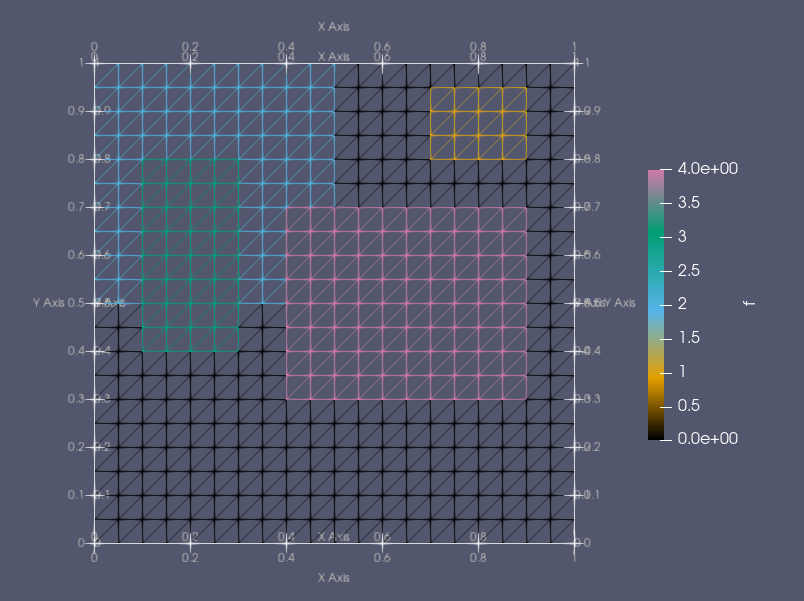
Example:
region1 = rs.GetRectangularRegion.from_floats(.7,.8,.9.95)
region2 = rs.GetRectangularRegion.from_floats(0.0,1.0,.5,.5)
region3 = rs.GetRectangularRegion.from_points(Point(0.3,0.4), Point(0.1,0.8))
region4 = rs.GetRectangularRegion.from_points(Point(0.9,0.7), Point(0.4,0.3))
Circular Region
This class selects circular regions. Its internal init method takes three floats describing the center of the circle and its radius. It also has two classmethods which can be used to instantiate the class, one which takes three floats and one which takes a point and a float.
class GetCircularRegion(SubDomain):
    def __init__(self, cx:float, cy:float, r:float):
        self.cx = cx
        self.cy = cy
        self.r = r

    @classmethod
    def from_points(cls, c:Point, r:float) -> 'GetCircularRegion':
        return cls(c.x(), c.y(), r)

    @classmethod
    def from_floats(cls, cx:float, cy:float, r:float) -> 'GetCircularRegion':
        return cls(cx, cy, r)

    def inside(self, x, on_boundary):
        return (x[0] - self.cx)**2.0 + (x[1] - self.cy)**2.0 <= r**2.0
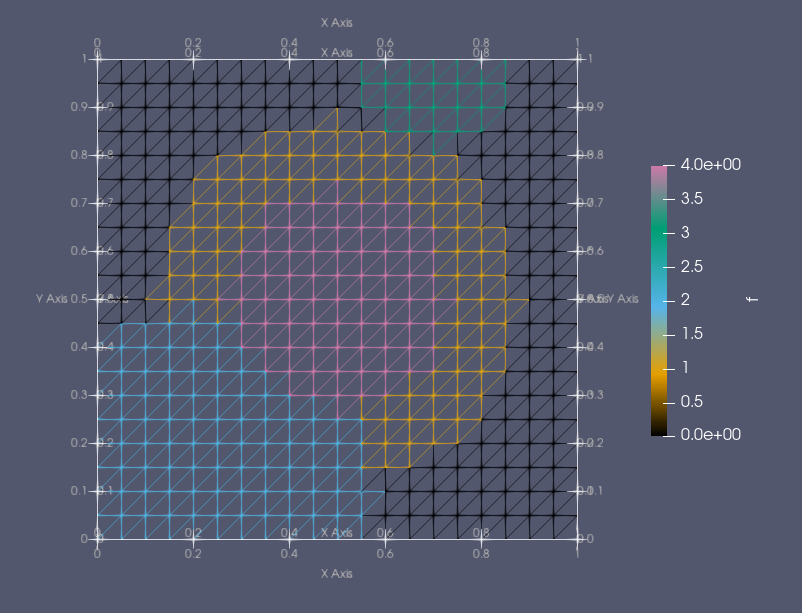
Example:
region1 = rs.GetCircularRegion.from_floats(.5,.5,.4)
region2 = rs.GetCircularRegion.from_floats(.2,.1,.4)
region3 = rs.GetCircularRegion.from_points(Point(0.7,1), .2)
region4 = rs.GetCircularRegion.from_points(Point(.5,.5), .25)
Linear Boundary
This class is used for selecting linear boundaries to regions. It only works with horizontal and vertical boundaries. These can either be defined with a pair of points on their ends or with one float representing the constant dimension, a pair of floats representing the range in the varying dimension, and a boolean representing whether the boundary is vertical or horizontal.
class GetLinearBoundary(SubDomain):
    def __init__(self, coord:float, range1:float, range2:float, horizontal:bool):
        super().__init__()
        self.coord = coord
        self.range1 = np.minimum(range1,range2)
        self.range2 = np.maximum(range1,range2)
        self.ishorizontal = horizontal

    @classmethod
    def from_points(cls, p1:Point, p2:Point) -> 'GetLinearBoundary':
        x1 = p1.x()
        y1 = p1.y()
        x2 = p2.x()
        y2 = p2.y()

        # If x doesn't change, line is vertical
        if near(x1, x2):
            return cls(x1, y1, y2, False)
        # If y doesn't change, line is horizontal
        elif near(y1, y2):
            return cls(y1, x1, x2, True)
        else:
            raise ValueError("Linear boundaries must be horizontal or vertical")

    @classmethod
    def from_floats(cls, coord:float, range1:float, range2:float, horizontal:bool) -> 'GetLinearBoundary':
        return cls(coord, range1, range2, horizontal)

    def inside(self,x,on_boundary):
        if self.ishorizontal:
            return near(x[1], self.coord) and between(x[0], (self.range1, self.range2)) and on_boundary
        else:
            return near(x[0], self.coord) and between(x[1], (self.range1, self.range2)) and on_boundary
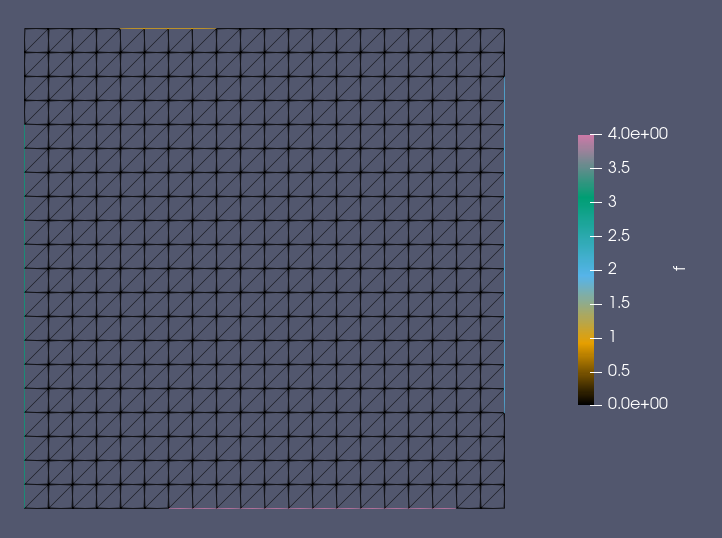
Example:
region1 = rs.GetLinearBoundary.from_floats(1.0,.2,.4, True)
region2 = rs.GetLinearBoundary.from_floats(1.0,.2,.9, False)
region3 = rs.GetLinearBoundary.from_points(Point(0.0,0.0), Point(0.0,0.8))
region4 = rs.GetLinearBoundary.from_points(Point(0.3,0.0), Point(0.9,0.0))
Complete Code
The complete code follows and can also be downloaded here.
from dolfin import *
import numpy as np

# Select rectangular region
class GetRectangularRegion(SubDomain):

    # x1: x coordinate of one corner
    # y1: y coordinate of one corner
    # x2: x coordinate of opposite corner
    # y2: y coordinate of opposite corner
    def __init__(self, x1:float, y1:float, x2:float, y2:float):
        super().__init__()
        self.x1 = np.minimum(x1, x2)
        self.y1 = np.minimum(y1, y2)
        self.x2 = np.maximum(x1, x2)
        self.y2 = np.maximum(y1, y2)

    # p1: Point of one corner of rectangle
    # p2: Point of opposite corner of rectangle
    @classmethod
    def from_points(cls, p1:Point, p2:Point) -> 'GetRectangularRegion':
        return cls(p1.x(), p1.y(), p2.x(), p2.y())

    # x1: x coordinate of one corner
    # y1: y coordinate of one corner
    # x2: x coordinate of opposite corner
    # y2: y coordiante of opposite corner
    @classmethod
    def from_floats(cls, x1:float, y1:float, x2:float, y2:float) -> 'GetRectangularRegion':
        return cls(x1, y1, x2, y2)

    def inside(self,x,on_boundary):
        return between(x[0], (self.x1,self.x2)) and between(x[1], (self.y1,self.y2))

# Select circular region
class GetCircularRegion(SubDomain):
    # cx: float x coord of circle center
    # cy: float y coord of circle center
    # r: float radius of circle
    def __init__(self, cx:float, cy:float, r:float):
        super().__init__()
        self.cx = cx
        self.cy = cy
        self.r = r

    # c: Point center of circle
    # r: float radius of circle
    @classmethod
    def from_points(cls, c:Point, r:float) -> 'GetCircularRegion':
        return cls(c.x(), c.y(), r)

    # cx: float x coord of circle center
    # cy: float y coord of circle center
    # r: float radius of circle
    @classmethod
    def from_floats(cls, cx:float, cy:float, r:float) -> 'GetCircularRegion':
        return cls(cx, cy, r)

    def inside(self,x,on_boundary):
        return (x[0] - self.cx)**2.0 + (x[1] - self.cy)**2.0 <= self.r**2.0

# Select linear horizonta/vertical boundary region
class GetLinearBoundary(SubDomain):
    # coord: Constant coordinate of the boundary line
    # range1: Min value along line to select
    # range2: Max value along line to select
    # horizontal: True/False whether the line is horizontal or vertical
    def __init__(self, coord:float, range1:float, range2:float, horizontal:bool):
        super().__init__()
        self.coord = coord
        self.range1 = np.minimum(range1,range2)
        self.range2 = np.maximum(range1,range2)
        self.ishorizontal = horizontal

    # p1: Point on one end of line
    # p2: Point on other end of line
    @classmethod
    def from_points(cls, p1:Point, p2:Point) -> 'GetLinearBoundary':
        x1 = p1.x()
        y1 = p1.y()
        x2 = p2.x()
        y2 = p2.y()

        # If x doesn't change, line is vertical
        if near(x1, x2):
            return cls(x1, y1, y2, False)
        # If y doesn't change, line is horizontal
        elif near(y1, y2):
            return cls(y1, x1, x2, True)
        else:
            raise ValueError("Linear boundaries must be horizontal or vertical")

    # coord: Constant coordinate of the boundary line
    # range1: Min value along line to select
    # range2: Max value along line to select
    # horizontal: True/False whether the line is horizontal or vertical
    @classmethod
    def from_floats(cls, coord:float, range1:float, range2:float, horizontal:bool) -> 'GetLinearBoundary':
        return cls(coord, range1, range2, horizontal)

    def inside(self,x,on_boundary):
        if self.ishorizontal:
            return near(x[1], self.coord) and between(x[0], (self.range1, self.range2)) and on_boundary
        else:
            return near(x[0], self.coord) and between(x[1], (self.range1, self.range2)) and on_boundary

# Selects a single point
class SelectPoint(SubDomain):
    # p: Point to select
    def __init__(self, p:Point):
        super().__init__()
        self.p = p

    def inside(self, x, on_boundary):
        return near(x[0], self.p.x()) and near(x[1], self.p.y())